
Split and rejoin files with ease
HJSplit is an easy-to-use, reliable, and freeware application, which can split a file within seconds. With plenty of configurable options, the program lets you split the file into predefined sizes. This makes it easier to store or share files on Microsoft Windows computers. Additionally, the latest version of the program, HJSplit 3.0, lets you rejoin split files. You can even compare different parts to check whether the file has been joined correctly or not. HJSplit is a lightweight application, which is available in the form of an executable file. For this old school app, there’s no installer, and the 300 kb file can be used from the get-go. The only problem is the outdated interface. But considering the straightforward usage, it doesn’t cause any issues.
Top Recommended Alternative

Straightforward, fast, and easy to use
File splitters and joiners are used to break apart large-sized files into smaller segments. This not only saves a good amount of hard disk space, but makes it easier to share files with friends, colleagues, and users around the world. Moreover, when it comes to downloading split files, basic internet connectivity will be sufficient to execute downloads. If you often share files over the internet, private networks, or flash drives, you’ll already know the importance of file splitters and joiners.
HJSplit download bundles a wide range of splitter and joiner tools. The application has been designed by Freebyte, which offers several file compression programs for different operating systems. As mentioned earlier, HJSplit is a freeware tool, which runs without installation. Therefore, it’s a useful app for portable devices. With the program, you can handle files up to 100 GB. As such, you can even split large-sized backup archives. Compared to GSplit and Hacha, this one is faster and easier to use.
How does HJSplit work?
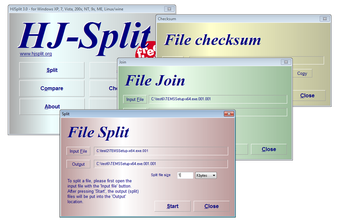
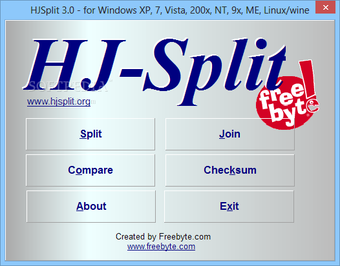
While the interface looks outdated, the company has focused on simplicity and sophistication. Without a lot of clutter, you can straight away start using the features required to split and join files. The interface comes with six buttons. Apart from ‘About’ and ‘Exit’, you’ll notice ‘Split’, ‘Compare’, ‘Checksum’, and ‘Join’. From the ‘About’ section, you can access an online ‘Help’ file and important web links.
With other buttons, you can perform multiple functions to join and split files. For instance, when you click ‘Join’ or ‘Split’, the program shows up simple dialog boxes, which involve browsing for destination and source files. Additionally, you can set the split file size, and proceed with the process by clicking ‘Start’.
HJSplit automatically splits and sorts the files. They’re even saved to the destination folder without any intervention. Using the tool, you can split several large-sized files, including multi-gigabyte files. It won’t take more than a few minutes to execute the process. HJSplit simplifies the entire process by identifying the .001 file on its own. This allows the program to identify the sequence while rejoining files.
Whether you split or join files, the software works quickly and provides you with a green progress bar to check the status. You can use the ‘Compare’ tool to quickly check the size of two different files. This comes in handy to make sure every file is the same size, which is important for the rejoining process.
In order to use the ‘Checksum’ generator, you can simply browse to a file and click ‘Start’. Once the checksum is ready, you can click ‘Copy’ to conveniently copy the file to the clipboard. Compared to Cryogenic FileSplitter, this is a useful tool to reduce errors while executing splitting and rejoining tasks.
It’s important to note that the program’s progress bar can be a bit sticky. For instance, it keeps hanging around on the desktop even after the job has been completed. Fortunately, that’s the limit of issues you’d face with HJSplit. The tool is simple, free, fast, and doesn’t cause any lags.
Is HJSplit a lightweight tool?
As mentioned earlier, this freeware utility tool doesn’t need to be installed on your Windows 10 PC. You can easily run the .exe file from a portable device. Therefore, it’s easy to carry this tool around in an external device to be used with any laptop or desktop computer. Additionally, it makes sure your Windows registry doesn’t get cluttered with unnecessary or redundant entries. With the minimalistic interface, this program is perfect for both rookies and expert IT professionals.
Like WinRAR, 7-Zip, and other file compression tools, HJSplit can be quite useful for handling backups. For instance, a large-sized file of 10 GB can be easily split into smaller parts, which can be burnt to DVDs, CDs, uploaded to services like Dropbox, or copied to flash drives.
All versions of HJSplit are compatible with each other, and let you exchange files between multiple operating systems. Simply put, a file split on Windows can be joined on a Linux system and vice versa. This allows you to use HJSplit on various platforms, ensuring you don’t need any other third-party software to join or split files.
Without a doubt, HJSplit is an excellent program for joining and splitting files of all sizes. It’s quite useful when you want to split large-sized files in order to share them online or store on external hard disks. This software is a good alternative to file compression tools. Since it’s completely free, you can continue using it without any payments.
An ideal choice among file splitters
Sharing large-sized files over the Internet has always been a huge problem. In fact, it can be troublesome to transfer such files via external drives too. Whether you’re planning to share movies or trying to upload documents to be shared with colleagues, HJSplit is an excellent choice. The program can quickly and easily convert large-sized files into smaller parts to be shared with ease. The same tool can be used to join split files, allowing you to view documents, movies, photos, etc. on multiple devices.